Briefly: an e-visa can only be applied for on the official website evisa.gov.vn. It's valid for up to 90 days, costs $25 for a single entry and $50 for multiple entries. Processing typically takes about three business days. Entry is not possible before the visa's start date, but later entry is possible. An e-visa cannot be extended within the country.
From June 2026, before arrival you will also need to fill out a free E-Arrival form and receive a QR code.
Completing the Vietnam e-Visa application often raises questions: the wording is in English, there are numerous fields, and nuances that are important to consider. Below is an example of how to complete the application, with explanations for each section, based on the form from the official website and my personal application experience.
How to apply for an e-Visa to Vietnam?
You can apply for an electronic visa yourself through the official portal of Vietnam : https://evisa.gov.vn.
Below is a step-by-step guide to help you correctly complete the e-Visa online form, prepare your photo, and avoid common application errors.
1. e-Visa Home Page
On the start page, click " Apply now " - this will take you to the application form.
This button leads to filling in personal data.
2. Portrait photography
You'll need to upload a photo of yourself to the website. You can take a photo with your phone or hire a photo studio.
Photo requirements:
- aspect ratio: 4×6 cm;
- format: jpg / jpeg;
- file size: < 2 MB;
- a level, frontal photo, without glasses or hats, the face is well lit;
- on a white background.
Non-professional photos taken with a phone are accepted when processing your application, provided they are of good quality and meet the above requirements.
Tip: If your photo is larger than 2 MB, you won't be able to upload it to your profile. However, you can reduce the photo size using one of the following methods:
- reduce the photo resolution (for example, reduce the size to 400x600 pixels)
- use a phone app (you can find any app by searching for the keywords "Photo compress")
- Use the Paint program on Windows: click "Resize" and reduce the size, for example, by 50%.
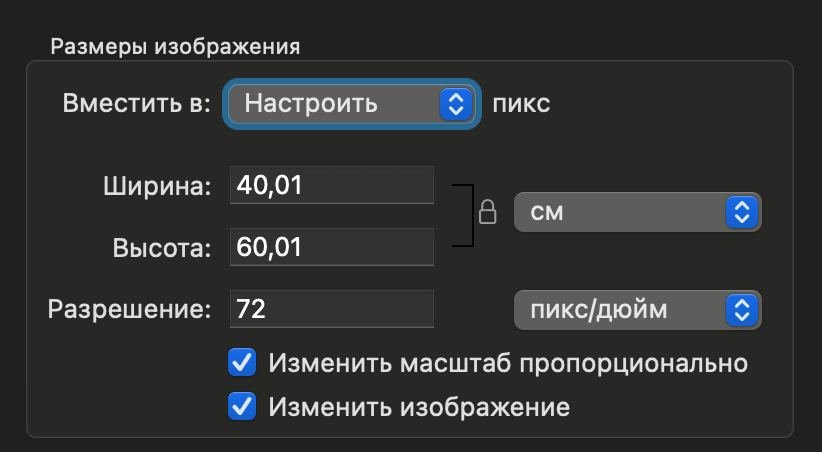
- If you have a MacBook, open the photo in the Image Viewer app, select Tools > Adjust Size, and reduce the resolution to 400x600 px.
Below is an example of photo settings for an e-visa application, which takes up 73 KB.
3. Personal Information
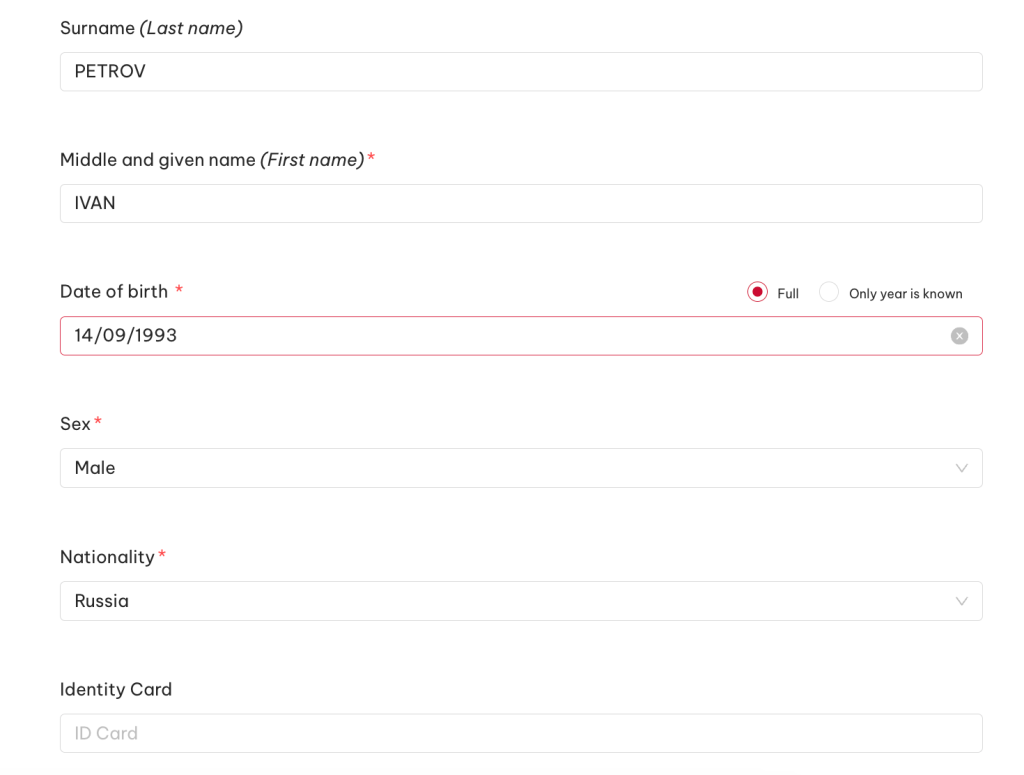
Surname (Last name)
Surname as in the foreign passport.
Example: PETROV
Middle and given name (First name)
First name and patronymic in Latin characters (include the patronymic only if it appears in your passport). If there is no patronymic, enter only the first name.
Example: IVAN
(if there is a patronymic in the passport, then IVAN ANDREEVICH)
Date of birth
Date of Birth.
Example: 14/09/1993
Fri
Select your gender: Male / Female
Example: Male
Nationality
Citizenship.
Example: Russia
Identity Card (optional)
This applies to ID cards of some countries.
Russians may NOT FILL OUT.
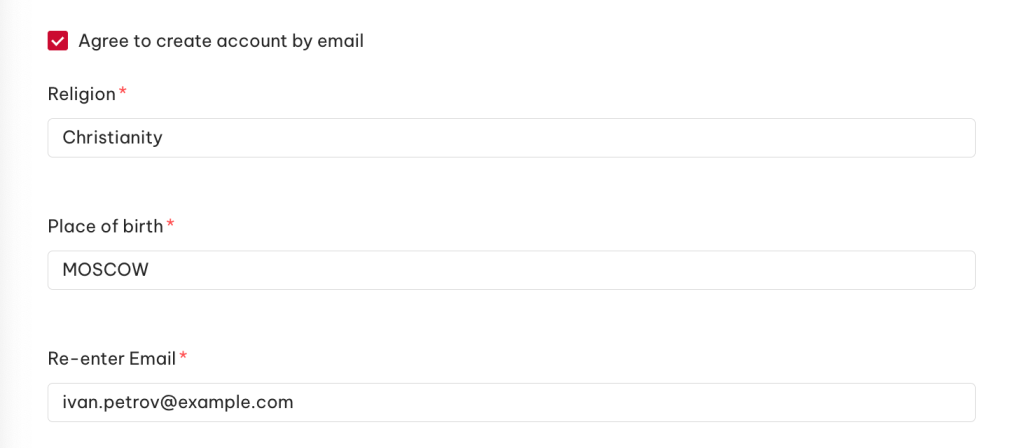
Enter the email address you would like to receive confirmation to.
Example: [email protected]
Religion
You can specify any or write NONE / NO RELIGION.
Example: Christianity
Place of birth
Place of birth as indicated in the passport.
Example: MOSCOW
Email + Re-enter Email
Please enter your email again.
Example: [email protected]
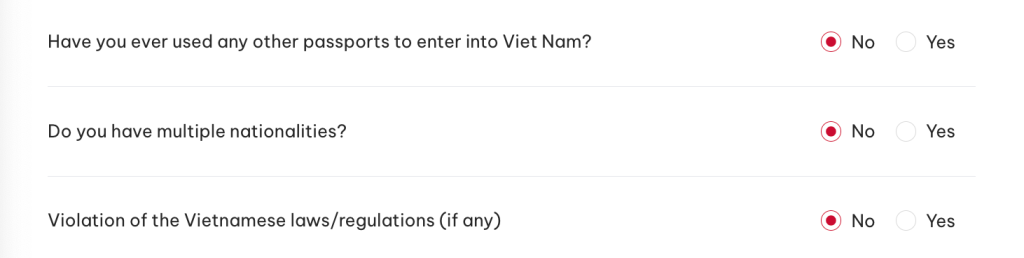
Have you ever used any other passports to enter into Viet Nam?
Have you ever used another passport to enter Vietnam? If not, select No.
Example: No
Do you have multiple nationalities?
Do you have another citizenship?
If one citizenship → No.
Violation of Vietnamese laws/regulations (if any)
Have you previously violated Vietnamese laws? If so, indicate "NO ." If you have (for example, an overstay or a fine), please answer honestly: false information on the application may be grounds for denial.
4. Requested information (information about the visa you are requesting)
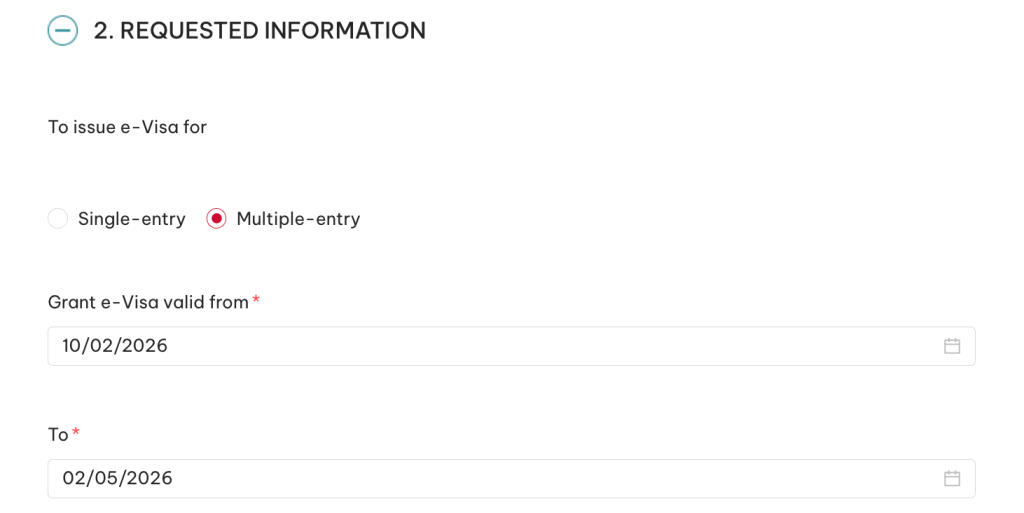
Single-entry / Multiple-entry
Choose what you need: Single-entry allows you to enter Vietnam once, while Multiple entry is recommended if you plan to travel outside of Vietnam, for example to Cambodia/Thailand and return to Vietnam.
Example: Multiple-entry
Grant e-Visa valid from (visa valid from date)
The date you want your visa to become valid. Your 90-day stay in Vietnam will begin from this date.
Important: You cannot enter Vietnam before this date, but you can enter later. You can use the same arrival date as on your plane ticket.
If your arrival time in Vietnam is set for early at night (e.g., 12:20 AM), you can set the date one day earlier in case your flight arrives at the airport earlier than scheduled. The main thing to remember is that you won't be allowed into the country before this date, even if the local time is 11:45 PM.
Example: 10/02/2026
To (visa valid until date)
E-visa expiration date.
Maximum - 90 days.
Example: 02/05/2026
5. Passport Information
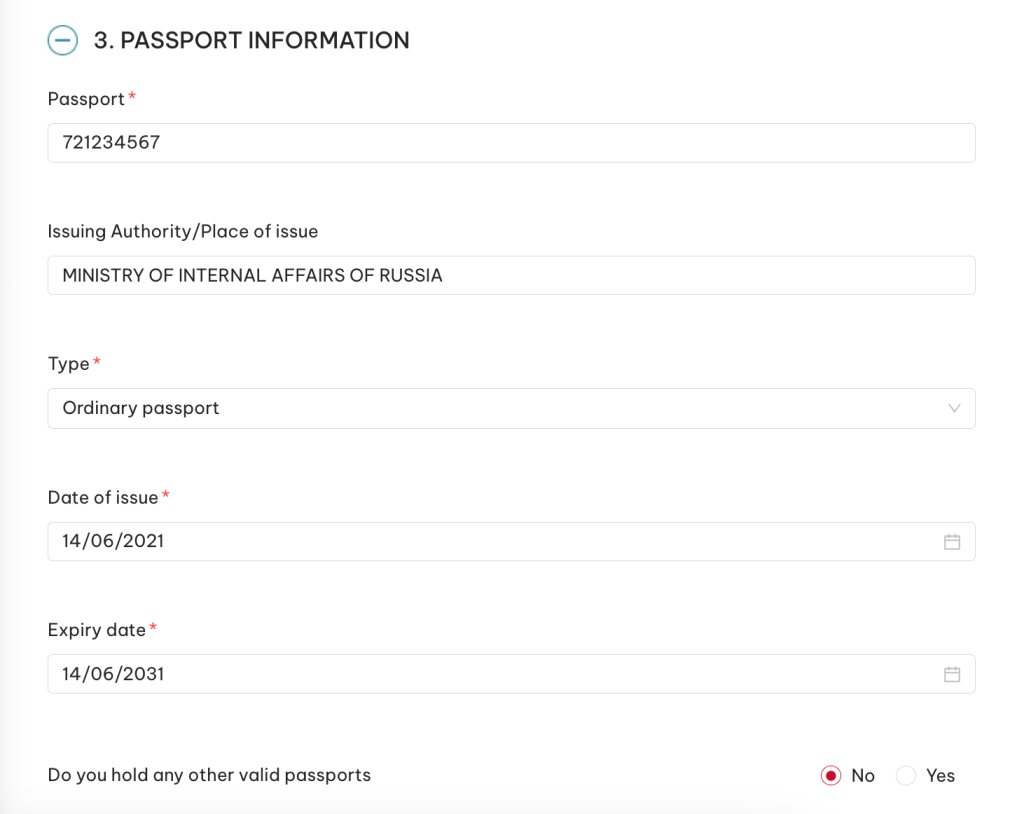
Passport
Foreign passport number without spaces.
Example: 72 1234567 → enter as 721234567
Issuing Authority / Place of issue
Issued by - enter the English version exactly as in your international passport.
Type
Example: MINISTRY OF INTERNAL AFFAIRS OF RUSSIA
Passport type.
Ordinary passport
Issue date
Date of issue of the foreign passport.
Example: 14/06/2021
expiration date
Passport expiration date.
Example: 14/06/2031
Do you hold any other valid passports
Do you have any other valid passports?
Please provide your passport details if you have another international passport or a passport from another country.
If not → No
6. Contact Information
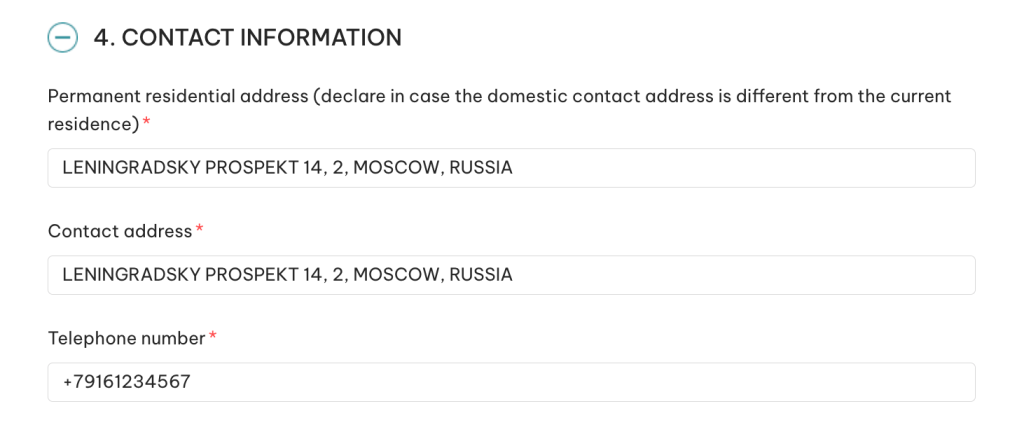
Permanent residential address
Your home address in your country of residence, in English.
Example: LENINGRADSKY PROSPEKT 14, 2, MOSCOW, RUSSIA
Contact address
Contact address. You can use the same address.
Example: LENINGRADSKY PROSPEKT 14, 2, MOSCOW, RUSSIA
Telephone number
Your phone number.
Example: +79161234567
Emergency contact
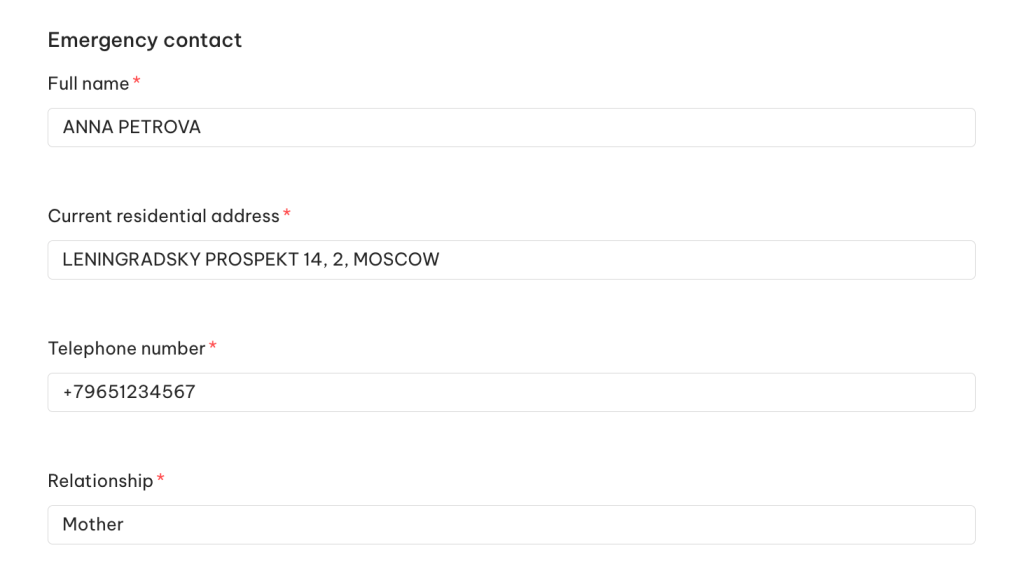
Contact information for emergencies. This can be any relative, friend, or other trusted person.
Example:
- Full name: ANNA PETROVA
- Address: LENINGRADSKY PROSPEKT 14, 2, MOSCOW
- Telephone number: + 79651234567
- Relationships: Mother
7. Occupation — Work / Study
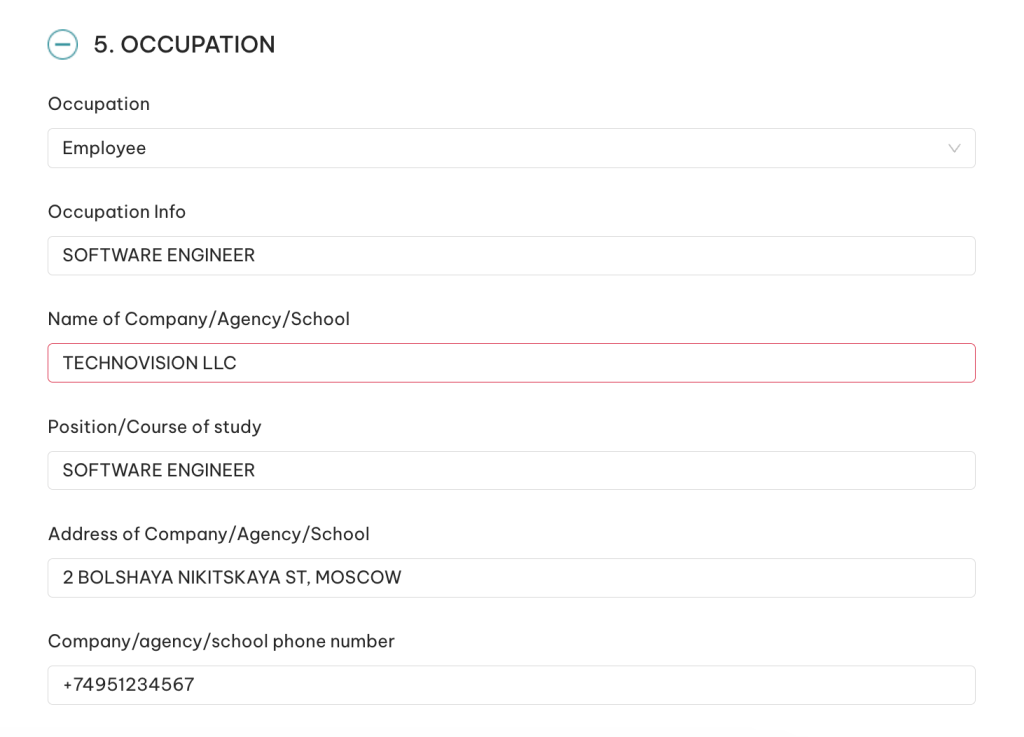
Occupation
Select Employee if you work for an organization; Businessman if you are self-employed; Student if you are not working but studying; Retired if you are retired.
Example: Employee
Occupation info
Your position, occupation
Example: SOFTWARE ENGINEER
Name of Company/Agency/School
The name of the company you work for, your sole proprietorship, or the institution you study at.
Example: TECHNOVISION LLC
Company Address
The address of the employer, educational institution, or the address at which the individual entrepreneur is registered)
Example: 12 BOLSHAYA NIKITSKAYA ST, MOSCOW
Company/agency/school phone number
Company phone number (you can specify any official one).
Example: +74951234567
8. Information about the trip
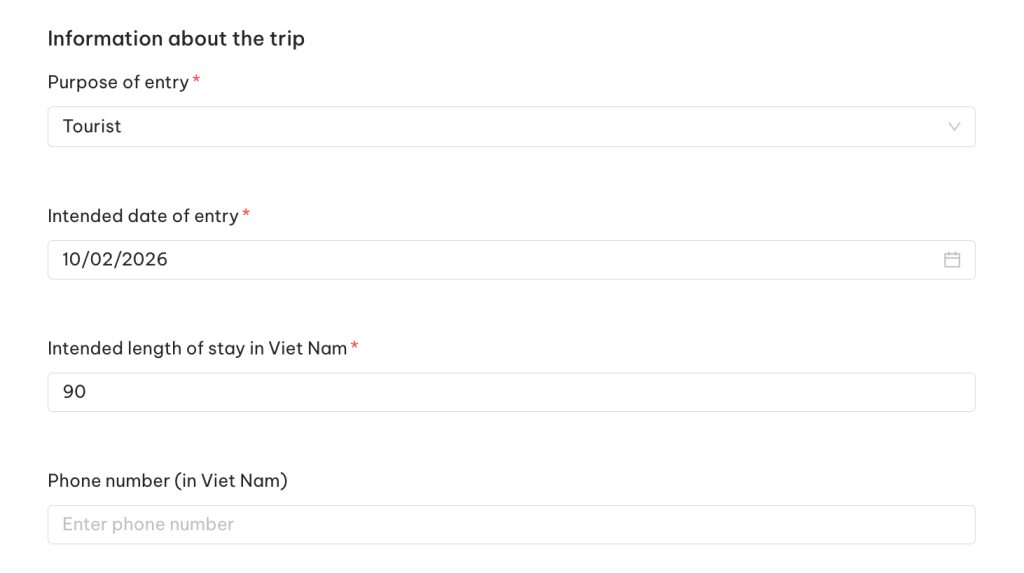
Purpose of entry
Select the purpose of your trip:
- Tourist
- Visiting relatives
- Working
- Business
- Other
Example: Tourist
Intended date of entry
When do you plan to enter the country?
If you're unsure of your arrival date in Vietnam, you can provide an approximate date for your planned trip. The key is to arrive within the visa's validity period, which is the period specified in the Requested Information section.
Example: 10/02/2026
Intended length of stay
How many days do you plan to spend in the country?
You can specify this based on your return ticket. If you're unsure, you can specify the planned duration or the entire validity of your visa (the maximum validity is currently 90 days).
Example: 90
Phone number in Vietnam (optional)
Phone number in Vietnam.
You can leave it blank or enter the hotel phone number.
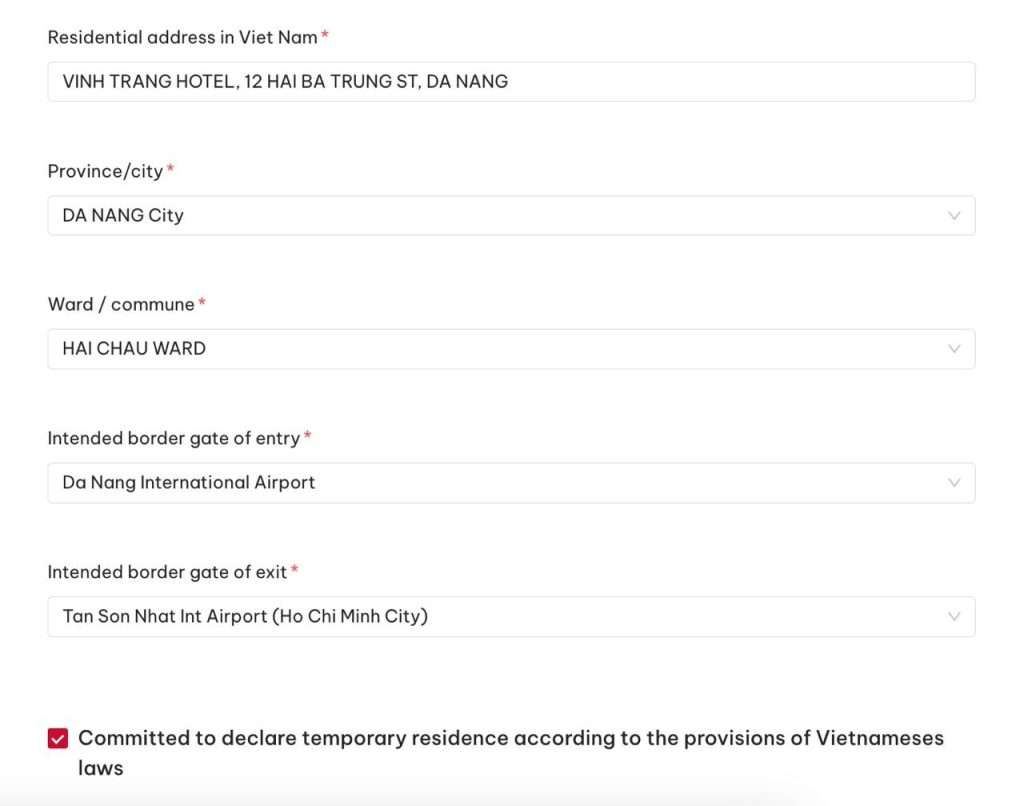
Residential address in Vietnam
Address of the first hotel.
You can only specify the first booking, not the entire route.
Example: VINH TRUNG HOTEL, 12 HAI BA TRUNG ST, DA NANG
Province / City
Select the city where the hotel is located.
Example: DA NANG City
Ward / Commune
Area (by hotel address).
Example: HAI CHAU WARD
Intended border gate of entry / exit
Border points through which you plan to enter and exit (airport or land point).
Example:
- Entry: Da Nang International Airport
- Exit: Tan Son Nhat Int Airport (Ho Chi Minh City)
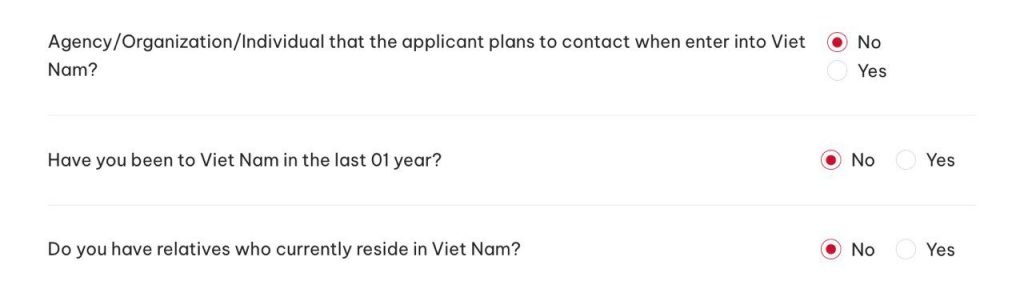
Agency/Organization/Individual that the applicant plans to contact when enter into Viet Nam?
Leave NO if there is no one officially organizing the trip for you (e.g. an agency) and you are not participating in any events, training, or volunteer programs.
Example: No
Have you been to Viet Nam in the last 01 year?
Have you visited Vietnam in the last year?
Example: No
Do you have relatives who currently reside in Viet Nam?
Do you have any relatives living in Vietnam at the moment?
Example: No
9. Children under 14 (optional)
If you are traveling without children → just leave it blank, nothing needs to be filled in.
If you are planning a trip with children under 14 years of age , you must fill in their full name in Latin characters, gender, date of birth, and attach a portrait photo similar to your own at the beginning of the application form.
10. Trip's expenses & Insurance
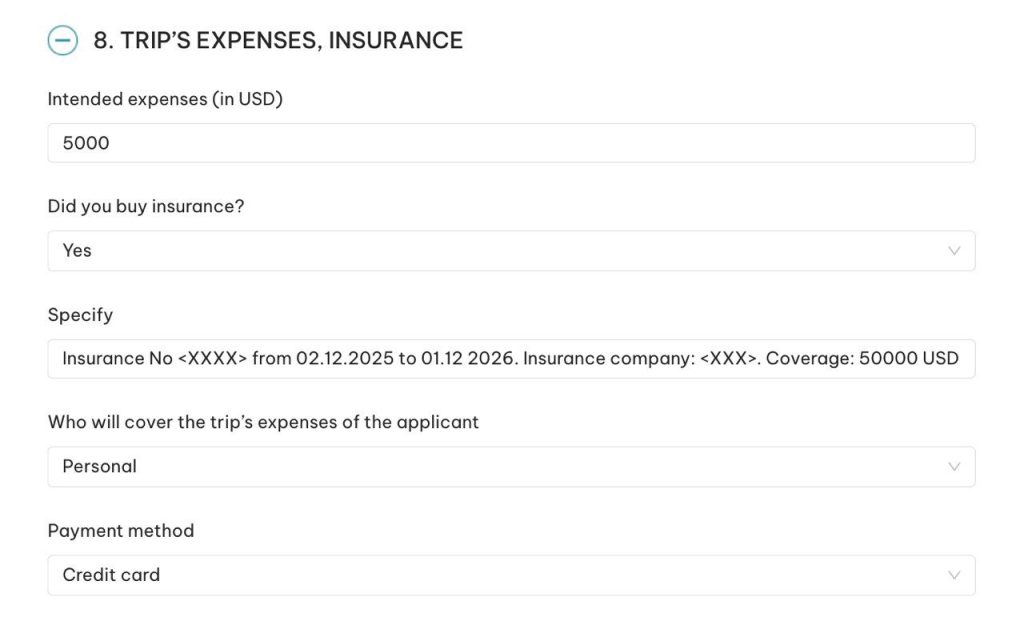
Intended expenses
Approximate cost of the trip. This is for informational purposes only.
Example: 5000 USD
Did you buy insurance?
Have you purchased insurance? If so, please indicate Yes.
If not, you can select No.
In any case, it is better to purchase insurance to protect yourself from unexpected medical expenses.
Example: Yes
(If you select Yes, then in the Specify field, indicate the number, dates, and organization of your insurance)
Example: Insurance No <XXXX> from 12/02/2025 to 12/01/2026. Insurance company: <XXX>. Coverage: 50000 USD
Who will cover the trip's expenses of the applicant
Who pays for the trip? Please indicate yourself (Personal) here if you don't have someone else who is financially responsible for you.
Example: Personal
Payment method
Payment method. Typically, credit card , but you can also choose cash. Both options are acceptable.
Example: Credit card
Completion
After checking all the information, click Next , then pay the visa fee (usually 25–50 USD, depending on which type of visa: single or multiple entry was selected).
This completes your visa application. You will receive a notification by email.
How to check the status of your e-Visa after submitting your application
You can check the status of your visa on the same website where you applied for your visa, in the section "Search":
https://evisa.gov.vn/e-visa/search.